Panel Console Method
Go to Paradise Panel
Write ownerid
“64_bit_steam_id” “optional_user_name” “optional_reason”for owner permissions.Write moderatorid ` “64_bit_steam_id” “optional_name” “optional_reason” ` for moderator permissions
Type server.writecfg to save the changes.
Server Config File Method
Go to File Manager
Navigate to /server/Rust/cfg/
Open or create a new file with the following name and extension: users.cfg
Write ownerid
“64_bit_steam_id” “optional_user_name” “optional_reason”for owner permissions.Write moderatorid
“64_bit_steam_id” “optional_name” “optional_reason”for moderator permissionsSave file and restart the server
Steps to get the 64SteamId:
Go to the Steam app
Click on your profile icon and select Account Details
Panel Console Method
Go to Console on panel
Write ownerid
“64_bit_steam_id” “optional_user_name” “optional_reason”for owner permissions.Write moderatorid `“64_bit_steam_id” “optional_name” “optional_reason”` for moderator permissions
Type server.writecfg to save the changes.
Server Config File Method
Go to File Manager
Navigate to /server/Rust/cfg/
Open or create a new file with the following name and extension: users.cfg
Write ownerid
“64_bit_steam_id” “optional_user_name” “optional_reason”for owner permissions.Write moderatorid `“64_bit_steam_id” “optional_name” “optional_reason”` for moderator permissions
Save file and restart the server
Steps to get the 64SteamId:
Go to the Steam app
Click on your profile icon and select Account Details
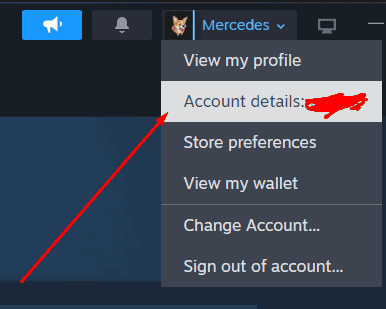
Copy the Steam Id
